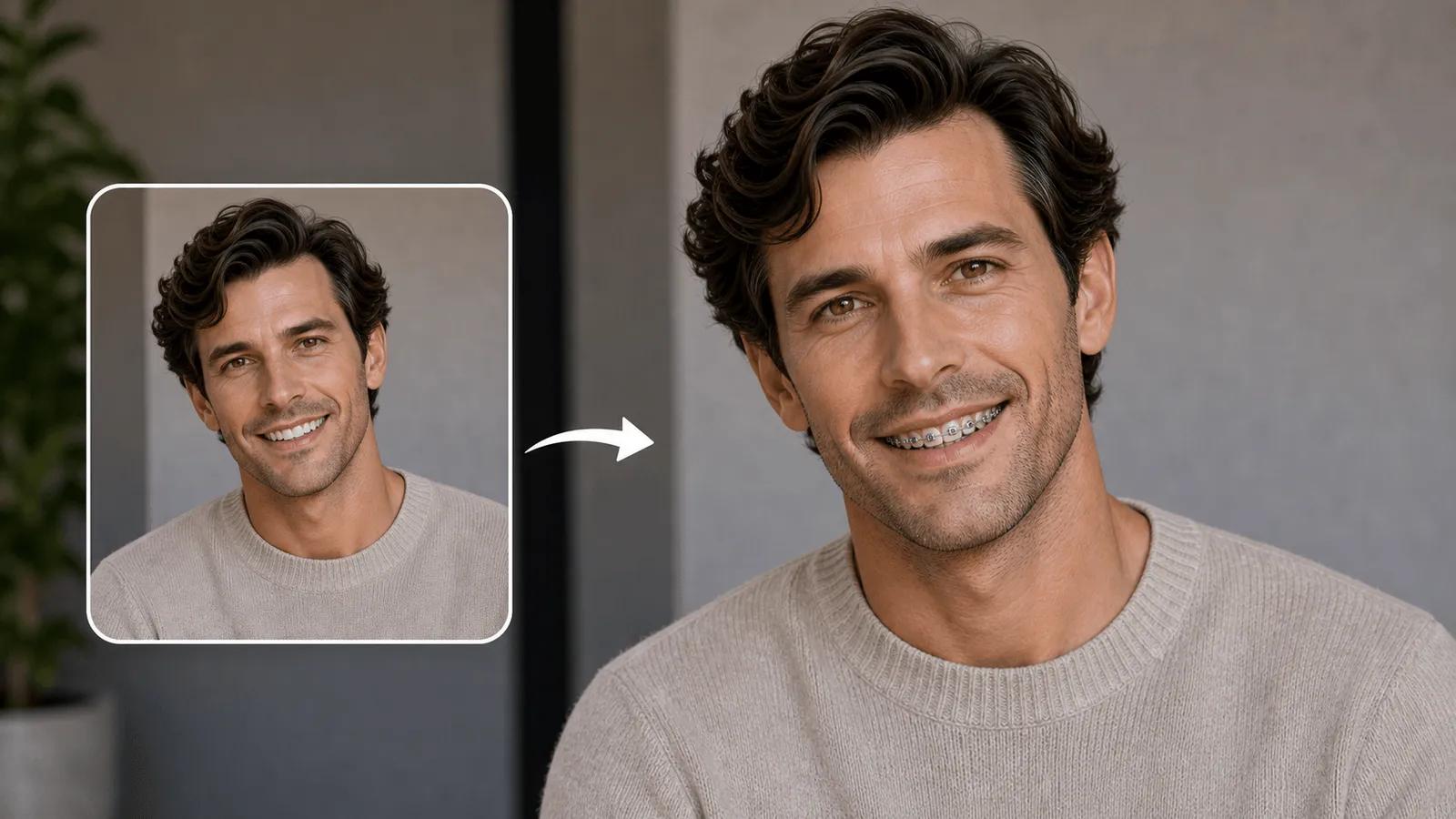
AI Braces Filter

Experience instant Virtual Braces Try-On with NanoImg.io's advanced AI Braces Filter. Free Braces Filter technology lets you see realistic braces simulation in seconds.

Click or drag to upload images

JPEG, PNG, WebP (max 5MB each, up to 4 images)

0/100
Samples
Example 1 - 后
Example 1 - 前
Auto
History

How to Use AI Braces Filter

1

Upload Clear Smile Photo

Upload a well-lit selfie showing your teeth clearly. NanoImg.io's AI Braces Filter works best with front-facing images for accurate Virtual Braces Try-On simulation.

2

Select Braces Type

Specify your preferred braces style - metal, ceramic, clear, or colorful bands. Our Free Braces Filter automatically detects teeth and applies realistic braces simulation without manual editing.

3

Get Instant Results

The Braces Simulator processes your photo in seconds, creating realistic Virtual Braces Try-On results. Download HD images perfect for orthodontic consultations or social media sharing.

NanoImg.io's AI-powered braces simulation

Advanced Virtual Braces Try-On Technology

NanoImg.io's AI Braces Filter uses cutting-edge facial recognition and smile detection to instantly place perfectly aligned braces on your teeth. Our Free Braces Filter provides true-to-life Virtual Braces Try-On simulation in seconds, with automatic teeth detection and natural lighting adjustment for realistic results. Try eyebrow filter or wrinkle remover for complete facial enhancements.

AI braces filter showing realistic dental braces simulation

Metal, ceramic, clear braces and more

Multiple Braces Types & Styles

Our Braces Simulator offers multiple orthodontic styles including traditional metal braces, ceramic braces, clear aligners, and colorful bands. The AI Braces Filter Online Free lets you experiment with different braces types by simply describing your preferred style - from classic metal to diamond-studded or rainbow braces for creative content. Explore age filter to see how braces look at different ages or baby generator for pediatric previews.

From orthodontic consultation to content creation

Medical & Social Media Applications

Use NanoImg.io's Virtual Braces Try-On for orthodontic consultations, reducing patient anxiety and improving treatment communication. Perfect for social media content creators generating TikTok and Instagram posts, or for teens exploring their future smile with braces before making treatment decisions.

AI Braces Filter FAQ

Everything you need to know about NanoImg.io's Virtual Braces Try-On technology

NanoImg.io's AI Braces Filter is an advanced Virtual Braces Try-On tool that uses facial recognition and smile detection to place perfectly aligned braces on your teeth. Our Free Braces Filter provides realistic braces simulation in seconds, helping with orthodontic decision-making and content creation.
Our AI Braces Filter Online Free uses advanced facial recognition to automatically detect your teeth and smile. The Braces Simulator analyzes facial structure, lighting, and jaw alignment to place realistic braces with proper positioning and natural shadows, creating authentic Virtual Braces Try-On results.
NanoImg.io's AI Braces Filter supports traditional metal braces, ceramic braces, clear aligners, colorful bands, and creative styles like diamond-studded or rainbow braces. The Free Braces Filter lets you experiment with different orthodontic styles through simple text descriptions.
NanoImg.io's Virtual Braces Try-On tool provides realistic visual previews perfect for patient education and reducing treatment anxiety. While our AI Braces Filter Online Free creates accurate simulations, professional orthodontic assessment is recommended for actual treatment planning and medical decisions.
Yes, NanoImg.io's AI Braces Filter supports batch processing of up to 4 photos simultaneously. The Braces Simulator processes each image individually, allowing you to see Virtual Braces Try-On results from different angles and expressions for comprehensive visualization.
NanoImg.io's AI Braces Filter delivers instant results, typically processing Virtual Braces Try-On simulations within seconds. The Free Braces Filter uses optimized AI technology for quick braces simulation, with real-time progress updates throughout the Braces Simulator processing.

Need additional help with Braces Filter? Contact our support team